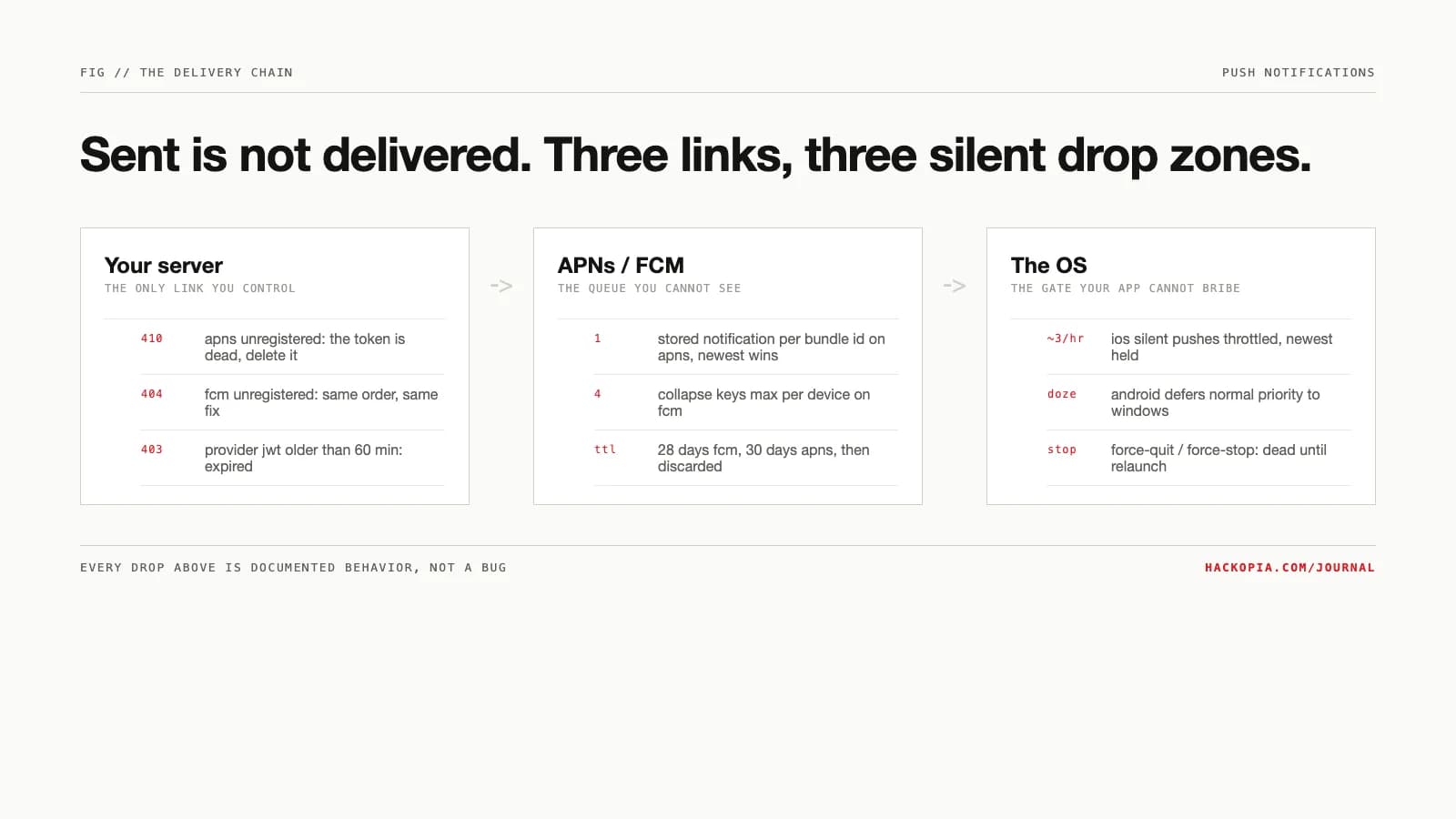
The support ticket writes itself: notifications worked in testing, then users stopped getting them. Nothing in your code changed. That is the correct observation, because push delivery is a three-party chain and your server only controls the first hop. Your provider server hands a device token to APNs or FCM, the push service hands it to the OS, and the OS decides whether the app ever sees it. Each link drops messages silently, by design, for reasons documented in plain sight.
The constraint
The only address your server has is a token minted by the push service, and that token is perishable by design. Apple's guidance is blunt: "Never cache the device token locally on the user's device. Device tokens can change periodically." FCM's own doc adds the sender-side duty: periodically refresh registration tokens on your server, monthly is the recommended cadence, and "detect invalid responses from FCM and respond by deleting" registrations that are invalid or expired. A token your database thinks is alive can correspond to an app that was uninstalled weeks ago.
The options
What you control as the sender comes down to three levers, and the failure modes sort under them.
Token hygiene. Register every launch, ship the current token to your server, and treat error responses as delete orders. APNs returns 410 with reason Unregistered when "the device token is inactive for the specified topic"; that token stays dead until the app registers a new one, and re-sending to it buys you a 429 TooManyRequests on that device token. FCM's HTTP v1 API signals the same with UNREGISTERED (404) and, for a confirmed-valid payload, INVALID_ARGUMENT (400). Google's docs state what to do: delete the registration.
Message class. Both services let you say how much a message matters. On APNs, apns-push-type separates alert pushes from background updates, and background pushes are explicitly best-effort: "the system treats background notifications as low priority... the system doesn't guarantee their delivery." On FCM, a collapsible message "may be replaced by a new message if it has yet to be delivered," and the server keeps a maximum of four collapse keys per device. Priority and TTL are the same lever: on Android and Web, FCM honors a TTL of 0 to 28 days, and APNs stores "only one notification per bundle ID" with an apns-expiration window up to 30 days.
Sender discipline. APNs authenticates your server with a JWT you must "refresh... no more than once every 20 minutes and no less than once every 60 minutes." FCM throttles collapsible traffic to "a burst of 20 messages per app per device, with a refill of 1 message every 3 minutes," and Android per-device limits sit at 240 messages per minute and 5,000 per hour. Above that, delivery is rejected, not delayed.
The mechanism
The failure map, link by link:
apns: stale jwt -> 403 ExpiredProviderToken
apns: dead token -> 410 Unregistered (delete it)
fcm: dead registration -> UNREGISTERED 404 (delete it)
fcm: per-device rate ceilings -> rejected, not queued
apns: one stored notification per bundle id, latest kept
fcm: four collapse keys queued per device, max
ttl expiry -> discarded
ios: silent pushes throttled, only the newest held
ios: force-quit = no relaunch until user opens app
android: doze defers normal-priority fcm to windows
android: force-stop = stopped state, no delivery
The last link is where "sent" diverges from "seen." iOS background notifications are "low priority," the system "may throttle" them, and Apple states the practical ceiling: "don't try to send more than two or three per hour." When a second silent push arrives, the system "discards the older notification and only holds the newest one." Force-quit is a hard wall: "The system does not automatically launch your app if the user has force-quit it," and delivery resumes only when the user relaunches.
The iOS gate is the same wall we measured in iOS will not run your sync in the background: background delivery on the platform's schedule, not yours.
Android's equivalent is Doze plus the stopped state. Doze "prevents apps from accessing the network and defers their jobs, syncs, and standard alarms," with periodic maintenance windows where deferred work runs. High-priority FCM is the documented escape hatch: it "let[s] you reliably wake your app to access the network" even inside Doze. But a force-stopped app is in the FLAG_STOPPED state, and Android's own docs describe that state as deliberate: the system keeps the app there "until the user explicitly removes the app from this state by directly launching the app." No push reaches it.
Where it bites
The lever that rescues urgent messages punishes routine ones. FCM "uses 7 days of message behavior" to decide whether your high-priority sends deserve the label; an app that ships high-priority messages that never surface a user-facing notification gets "deprioritized to normal priority or delegated for handling by Google Play Services," per application instance. Cry wolf on priority and the emergency channel closes.
Token staleness bites at scale, not in testing. FCM marks a registration stale after a month disconnected and "considers it expired" at 270 days on Android, after which sends are rejected. A device restored from another device's backup data gets a new APNs token the app cannot learn until the next launch. The result: every sender's database drifts toward fiction, and the only correction is processing error responses. The subtlest bite is 429 TooManyRequests per device token from APNs: you can throttle yourself by re-sending to a device faster than the service allows, which is how "retry until it works" becomes "nothing works."
The numbers
- FCM per-device ceilings on Android: 240 messages per minute and 5,000 per hour to a single device. Project-wide: 1,000 concurrent fanouts, topic-subscription changes capped at 3,000 QPS.
- FCM registration lifecycle: stale after about a month inactive, expired and garbage-collected at 270 days on Android.
- APNs provider JWT: refresh between 20 and 60 minutes; violations return
429 TooManyProviderTokenUpdatesor403 ExpiredProviderToken. - Message retention: FCM TTL runs 0 to 28 days; APNs stores a notification for 30 days or less via
apns-expiration.
Our position
Treat the token table as a cache, not a ledger: register every launch, delete on 410 and UNREGISTERED without retrying, and refresh registrations monthly. Classify messages honestly: alerts for things a user must see, collapsible with a real TTL for everything else, and never burn the high-priority channel on sync traffic. On iOS, design around silent push being a hint, not a guarantee: fetch state on launch instead of trusting the payload arrived. And measure what you can actually verify: delivery receipts where the platform offers them, in-app "last opened" timestamps everywhere else. "Accepted by APNs" is not a delivery metric.
The takeaway
delete on apns 410 / fcm UNREGISTERED + INVALID_ARGUMENT
high priority = urgent only; overuse gets deprioritized
delivery resumes on user relaunch, not on your retry
This is the sender-side playbook we run on apps like CashTaq as part of product engineering: the app can only control link one, so link one gets engineered properly. If your notification metrics went quiet, send us the sender stats and we will tell you which link is dropping.
// sources
// next step
We work this way on client projects too.
Tell us what you are making. We reply with a plan, a timeline, and a price.
