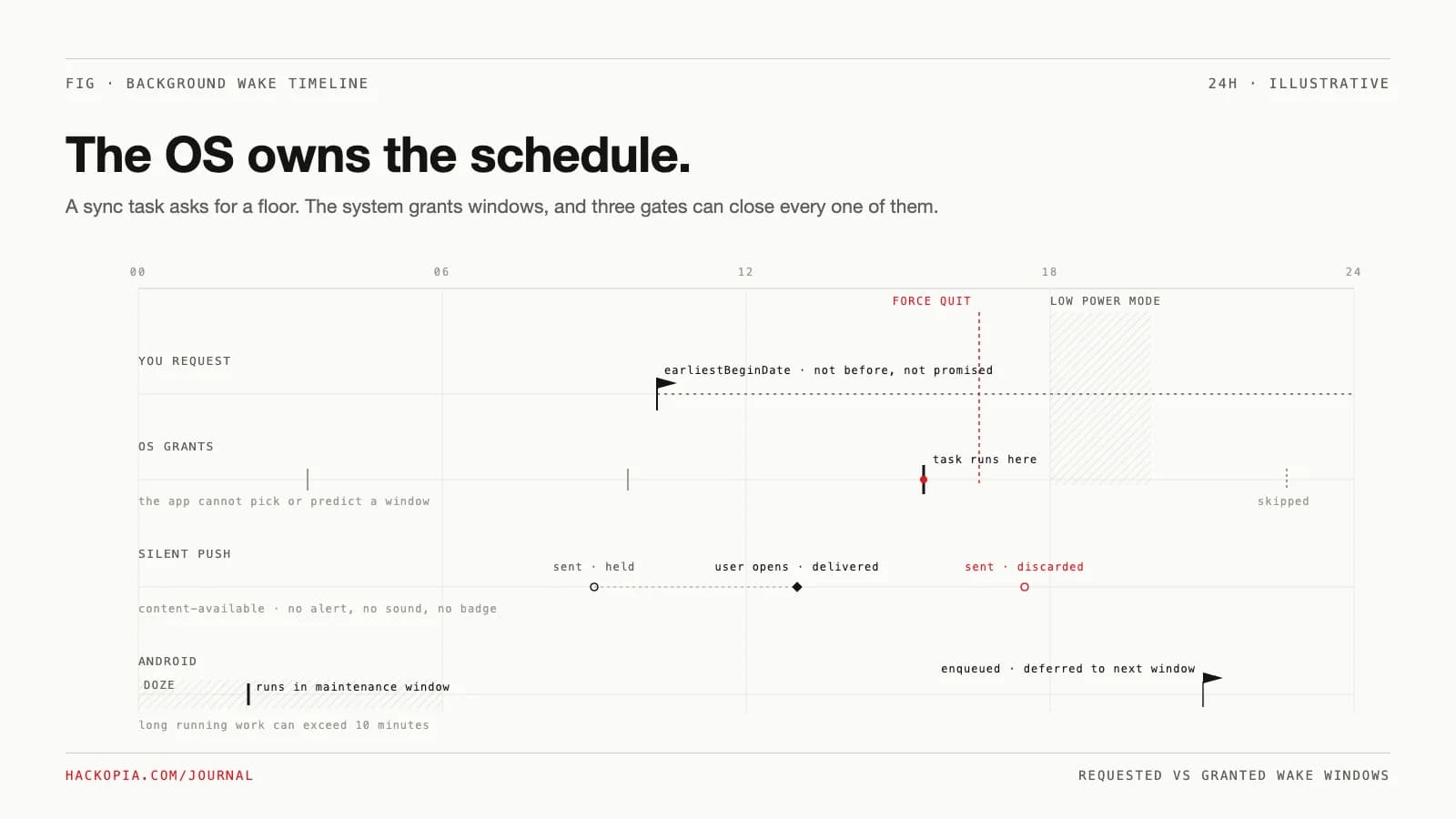
A user closes your app at noon. Your server writes three updates before dinner. The user opens the app at 21:00 and sees stale data for two beats while the fetch catches up. Somewhere in the codebase is a comment that says the background task handles this. It does not, and the reason is not a bug: the operating system owns the schedule, and it never sold you a guarantee.
The constraint
The server is the source of truth, the device is suspended, and the product promise is "open the app, see current data." On iOS the app is frozen the moment it leaves the foreground: applicationDidEnterBackground "has approximately five seconds to perform any tasks and return," after which the app is suspended and, per Apple, "apps don't normally receive any extra execution time." So the only ways truth reaches a suspended app are the ones the OS offers, and every one of them is a request, not a contract.
The options
Sync on open only. No background machinery at all: launch, fetch the delta, render. This is the honest baseline and it never lies to the user. It loses only on perception: a spinner on every open reads as slow even when it is fast.
Silent push plus BGTaskScheduler. The standard answer. A content-available push wakes the app, or the scheduler runs a registered refresh task. The fine print: background notifications are low priority, "the system doesn't guarantee their delivery," Apple says "don't try to send more than two or three per hour," and it coalesces them, keeping only the newest one held. Scheduled tasks are no firmer: earliestBeginDate means "the background task shouldn't start any earlier than this date," and Apple is explicit that the system "doesn't guarantee launching the task at the specified date, but only that it won't begin sooner."
Server-side state plus a cheap fetch on launch. Move the deadline off the device entirely: precompute deltas, digests, and read models on the server so the open-time fetch is one round trip. The non-obvious win is that this makes "sync on open" fast enough that the background question stops mattering. It costs server work you might not have budgeted.
Background URLSession. Real and worth knowing, but it solves bytes, not timing. Transfers "continue to run even when your app is suspended," yet the actual transfer runs "in a process that is separate from your app's process," and transfers started in the background are treated as discretionary: the system waits for optimal conditions like power and Wi-Fi. Use it for payloads, not for freshness.
The mechanism
The registration is small. The scheduling contract is the part to read:
// register during app launch; the system calls the handler when it decides
BGTaskScheduler.shared.register(
  forTaskWithIdentifier: "com.example.sync.refresh",
  using: nil
) { task in
  self.handleRefresh(task: task as! BGAppRefreshTask)
}

func scheduleRefresh() {
  let request = BGAppRefreshTaskRequest(identifier: "com.example.sync.refresh")
  // request, not appointment: the task won't begin sooner, may begin much later
  request.earliestBeginDate = Date(timeIntervalSinceNow: 15 * 60)
  do {
    try BGTaskScheduler.shared.submit(request)
  } catch {
    print("submit failed: \(error)")
  }
}

func handleRefresh(task: BGAppRefreshTask) {
  scheduleRefresh()              // resubmit replaces the previous request
  task.expirationHandler = {
    // system is reclaiming the budget; cancel in-flight work here
  }
  // ... fetch the delta, then:
  task.setTaskCompleted(success: true)
}
Two kinds of tasks exist. BGAppRefreshTask covers "short-duration tasks that expect quick results, such as downloading a stock quote." BGProcessingTask covers "tasks that might be time-consuming" and can ask for requiresExternalPower and requiresNetworkConnectivity. Both live behind two gates your code cannot see: the Background App Refresh setting the user can switch off, and whatever window the OS decides to grant.
What do those gates do to a real day? This model encodes the documented rules (wake windows are illustrative, the gates are not). Run it with node sim.mjs:
const H = 60;
const DAY = 24 * H;
const t = (h, m = 0) => h * H + m;
const hm = (x) =>
  `${String(Math.floor((x % DAY) / H)).padStart(2, "0")}:${String(x % H).padStart(2, "0")}` +
  (x >= DAY ? " +1d" : "");

// one device day, identical in every scenario
const opens  = [t(8, 10), t(13, 5), t(21, 30)];   // user opens the app
const charge = [t(0, 30), t(6, 45)];              // plugged in [start, end]
const lpm    = [t(18), t(20)];                    // low power mode on
const wakes  = [t(0, 40), t(3, 15), t(7, 55), t(14, 20), t(19, 35), t(23, 10)];
const maint  = [t(2, 10), t(5, 50)];              // android doze maintenance windows
const sent   = [t(9, 15), t(11, 0), t(16, 45)];   // silent pushes the server sent
const earliest = t(8, 45);      // submitted 08:30, earliestBeginDate = +15 min

const inRange = (x, [a, b]) => x >= a && x < b;
const nextOpen = (after) => opens.find((o) => o > after) ?? opens[0] + DAY;

// ios: BGAppRefreshTask. the request only guarantees "not sooner".
function refresh({ barOn, forceQuitAt = null }) {
  for (const w of wakes) {
    if (w < earliest) continue;                    // earliestBeginDate
    if (!barOn) continue;                          // user disabled the setting
    if (inRange(w, lpm)) continue;                 // low power mode turns it off
    if (forceQuitAt !== null && w > forceQuitAt) continue; // not relaunched
    return w;
  }
  return null;
}

// ios: silent push. newest held only, discarded on force quit,
// delivered the moment the user launches the app.
function silentPushes({ forceQuitAt = null }) {
  return sent.map((s) => {
    if (forceQuitAt !== null && s > forceQuitAt)
      return `${hm(s)} sent -> discarded (force quit)`;
    const o = nextOpen(s);
    return `${hm(s)} sent -> held, delivered on open ${hm(o)}`;
  });
}

// ios: BGProcessingTask with requiresExternalPower: idle + charging only
// requested 08:45, today's charge window is gone -> tomorrow's
const processing = charge[0] + DAY;

// android: workmanager defers to doze maintenance windows
const enqueued = t(23, 0);
const androidRan = maint[0] + DAY; // next window after enqueue

console.log("-- ios BGAppRefreshTask, earliestBeginDate", hm(earliest));
console.log("refresh on          first wake " + hm(refresh({ barOn: true })) +
            "   (open " + hm(t(13, 5)) + " already synced)");
{
  const w = refresh({ barOn: false });
  console.log("refresh off         first wake " + (w ? hm(w) : "none") +
              "      sync waits for open " + hm(t(21, 30)));
}
{
  const w = refresh({ barOn: true, forceQuitAt: t(15) });
  console.log("force quit 15:00    last wake " + (w ? hm(w) : "none") +
              "      windows after the quit never fire");
}
console.log("-- ios silent push (content-available)");
for (const line of silentPushes({ forceQuitAt: t(15) })) console.log(line);
console.log("-- ios BGProcessingTask (requiresExternalPower)");
console.log("requested " + hm(earliest) + " -> runs next charge window " +
            hm(processing) + ", coalesced overnight");
console.log("-- android workmanager");
console.log("enqueued " + hm(enqueued) + " -> doze defers to maintenance window " +
            hm(androidRan));
console.log("periodic request for 5 min -> clamped to 15 min minimum interval");
Running it produces:
-- ios BGAppRefreshTask, earliestBeginDate 08:45
refresh on          first wake 14:20   (open 13:05 already synced)
refresh off         first wake none      sync waits for open 21:30
force quit 15:00    last wake 14:20      windows after the quit never fire
-- ios silent push (content-available)
09:15 sent -> held, delivered on open 13:05
11:00 sent -> held, delivered on open 13:05
16:45 sent -> discarded (force quit)
-- ios BGProcessingTask (requiresExternalPower)
requested 08:45 -> runs next charge window 00:30 +1d, coalesced overnight
-- android workmanager
enqueued 23:00 -> doze defers to maintenance window 02:10 +1d
periodic request for 5 min -> clamped to 15 min minimum interval
The pattern to notice: on a healthy device the task did fire, at 14:20, over five hours after the request, and by then the 13:05 open had already synced. The background task was a latency optimization for a fetch that already happened.
Where it bites
The user holds the off switch. Background App Refresh is a user-facing setting under Settings > General, and Apple tells users that if they quit an app from the app switcher "it might not be able to run or check for new content before you open it again." Low Power Mode "turns off Background App Refresh" outright. Every gate in the model above is a documented behavior, not an edge case.
Processing tasks die on contact with the user. Apple's words: "Processing tasks run only when the device is idle. The system terminates any background processing tasks running when the user starts using the device." Flag it for external power and it becomes an overnight chore, coalesced into the charging window you see in the trace.
Silent push is a hint, not a channel. Two or three an hour, delivery not guaranteed, only the newest held, and "if something force quits or kills the app, the system discards the held notification." Design it as "newest wins" and it is fine; design it as a transport and it drops state.
The OS grades your behavior. Apple's legacy fetch docs warned that an app slow to call its completion handler "may be given fewer future opportunities to fetch data." The scheduler learns from how you spend the budget it grants.
Android is the same shape, different vocabulary. WorkManager splits work into immediate, long running, and deferrable, persists requests in SQLite across reboots, and still defers to the OS: Doze "prevents apps from accessing the network and defers their jobs, syncs, and standard alarms," and since "WorkManager uses JobScheduler internally," its tasks do not run until a maintenance window, which the system schedules "less frequently" the longer the device sits idle. Periodic work cannot go below a 15-minute interval, expedited work spends a per-app quota sized by standby bucket, and an idle app gets network access "around once a day." Neither platform promises a clock. The conflict-resolution cost of syncing late and rarely is the subject of our offline sync conflicts post.
The numbers
- iOS grants about five seconds in
applicationDidEnterBackground, then suspends. The legacy fetch API allowed "up to 30 seconds of wall-clock time"; silent-push wakes get "30 seconds to perform any tasks and call the provided completion handler." BGProcessingTask"can run for minutes" but only while the device is idle.- Silent pushes: two or three per hour, per Apple's guidance.
- WorkManager: 15-minute minimum periodic interval; expedited quota varies by standby bucket; App Standby allows idle apps network access about once a day.
Our position
Design every sync feature as if the background run will never happen, because nothing on iOS guarantees it will. The server is authoritative, the open-time fetch is the sync, and BGTaskScheduler plus silent push exist only to make the open-time fetch find less work. If correctness requires code to run at a wall-clock time on a suspended iPhone, the requirement is wrong: move that deadline server-side. Pick BGProcessingTask for the heavy reconcile only when a next-charge-window cadence is acceptable, and treat every silent push as "something changed, fetch on next wake," never as a payload you depend on.
The takeaway
expect hours of slippage or silence, never a schedule
it dies the moment the user picks the phone up
never put required state in the payload
This is the shape we put behind the mobile apps in our product engineering work. If your app promises real-time data and your users see stale screens, send us the sync path and we will show you which gate is closed.
// sources
// next step
We work this way on client projects too.
Tell us what you are making. We reply with a plan, a timeline, and a price.
