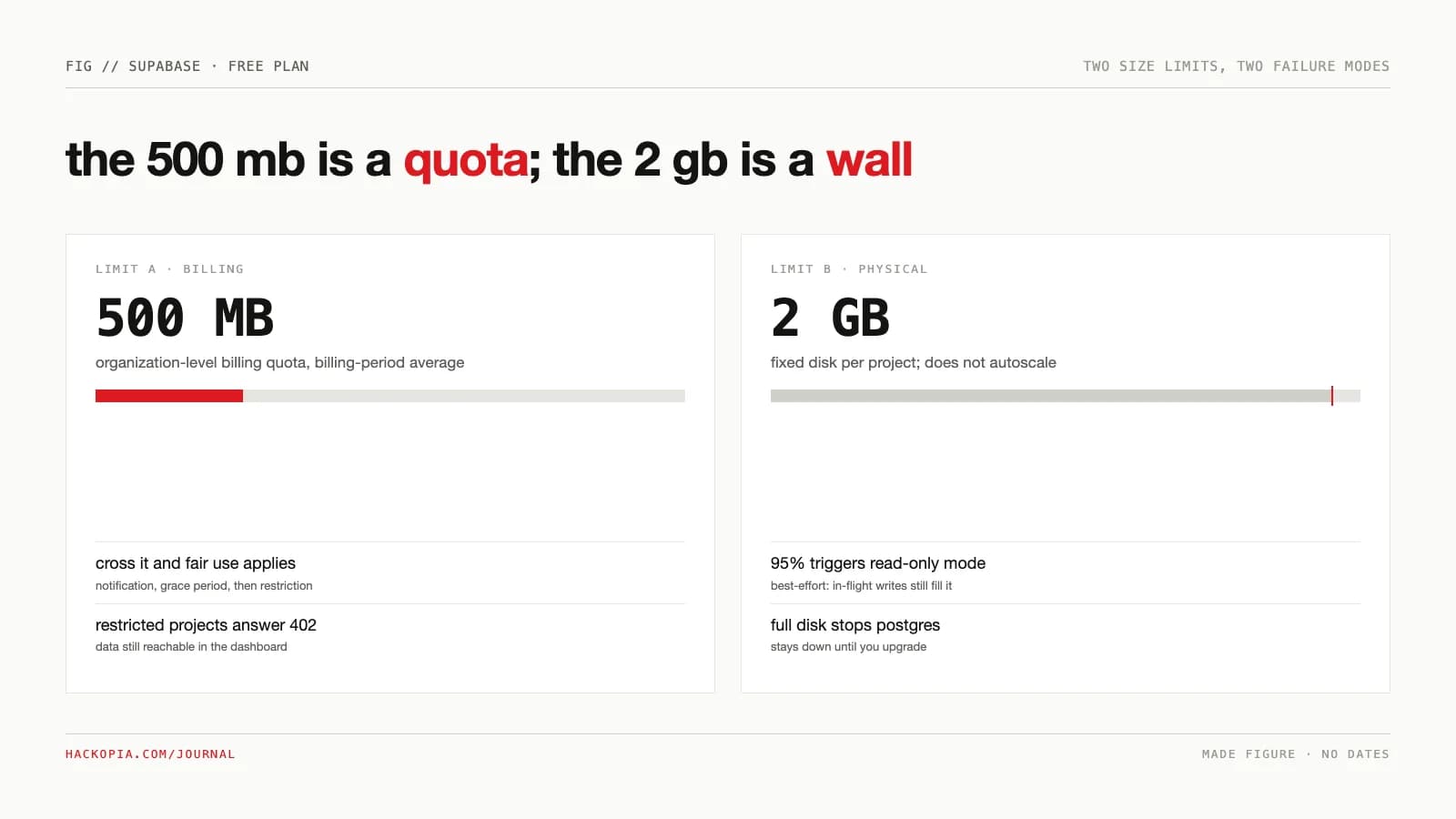
Supabase's free plan is generous enough to run a real product on, which is exactly why its limits surprise people: they are not where the pricing card suggests. The famous "500 MB database" is a billing quota enforced at the organization level. The physical disk underneath is 2 GB and has its own, harder failure mode. And the limit most likely to take your project down costs no quota at all: seven days of inactivity.
The constraint
The question a free tier has to answer is not "is it free" but "which limit fires first, and does it fail loud or silent." A side project, a demo, a client prototype: each hits a different wall, so the limits need to be read as a sequence, not a list.
The options
Plan capacity to the 500 MB quota. The number on the pricing card, and the one people defend. Loses on two counts: the quota is an org-level average enforced softly through grace periods, while the physical 2 GB disk fires first and fails harder. Defending the gentlest limit leaves the hardest one unguarded.
Set a keep-alive ping and call it handled. The fix everyone reaches for, and it does stop the pause. It does nothing for the disk wall or the missing backups, and now you are running infrastructure to keep free infrastructure alive, which is worth noticing.
Start on Pro. $25 a month buys 8 GB of disk, 250 GB of egress, seven days of backups, and a project that never sleeps. Wins for anything that must stay up; loses for throwaway prototypes, where the pause clock is free lifecycle management rather than an outage.
The mechanism
Two different size limits coexist, and the docs separate them carefully. The 500 MB database size is "a billing quota for your organization," enforced through the Fair Use Policy: exceed it and "the projects of your organization may be restricted from processing requests," returning "a 402 status code together with a description of why the project is restricted." You keep dashboard access to your data throughout.
The 2 GB disk is physical and does not autoscale: "when disk usage reaches 95%, Supabase puts your database into read-only mode," and "if the disk becomes full, Postgres shuts down. It stays down until you upgrade to the Pro Plan." Read-only is best-effort: WAL and in-flight writes can still fill the disk after it starts.
The pause clock is the third mechanism. Free projects pause after a week of low activity ("typically a few user requests to the database each day" is enough to stay up). Supabase emails a warning roughly one week before and a confirmation at pause. A paused project is restorable in Studio for one year; older material cites 90 days, which the June 2024 changelog set and later docs extended. No exact deletion date is published after that window; once deleted, "all associated data including backups is permanently removed."
The project cap is account-wide: two active free projects across every organization where you are Owner or Admin. Paused projects do not count, so the juggling pattern is real: pause the dormant one, run the live one, keep a spare slot.
Where it bites
The pause is the silent killer. A demo link sent to a client goes dead because nobody hit the database that week. The warning email goes to the project owner, which in agency work is often the freelancer's account, not the person who notices. The fix is a cron ping, but now you are running infrastructure to keep free infrastructure alive.
Read-only at 95% is a best-effort warning, not a wall. The docs say plainly that writes in progress and WAL can complete the fill anyway. An import job or a log-happy table can take a project from fine to Postgres-down in one run, and the only way back is a paid plan.
The quota is an average, not a tripwire. Fair Use enforcement keys on continual exceedance at the org level, which means a spike does not instantly 402 you but also means the notification-and-grace-period path is the only warning before restriction.
Backups are not a thing on Free. No automatic backups, no point-in-time recovery, one-day log retention. Your data's only safety net on the free plan is the pause-restore window, which exists to protect Supabase's resources, not yours.
What is genuinely unlimited: API requests, paused projects, and your dedicated Postgres instance per project (Free runs Nano compute: shared CPU, up to 0.5 GB RAM). There is no DAU cap; auth is metered by MAU only, at 50,000.
The numbers
Every figure below is a documented limit, not an anecdote:
- 500 MB billing-quota database per project; 2 GB fixed physical disk per project (database size doc).
- 5 GB egress plus 5 GB cached; 1 GB storage; 500,000 edge function invocations; 2 million realtime messages at 200 peak connections (billing quota table).
- 50,000 MAU; SSO unavailable on Free; 2 active projects account-wide; paused projects unlimited (billing quota table).
- 1 week of low activity to pause; 1 year to restore (pausing doc); 0 automatic backups.
- Pro starts at $25/month with 8 GB disk, 250 GB egress, 7-day backups, and no pausing, per the pricing page.
Our position
Free is a prototyping tier with a real production failure mode hiding inside it. Run it for demos, internal tools, and anything you can afford to lose a week of, but treat three things as non-negotiable from day one: a keep-alive ping on any project that must stay up, your own backup job (pg_dump on a schedule, not faith in the platform), and a migration date in the calendar for the day the 500 MB average or the 95% disk gets close. The free tier's job is to prove the product; the moment the product proves itself, the $25 is the cheapest infrastructure line item you will ever approve.
The takeaway
full; wal can still finish the fill
average; overage ends in 402 restriction, not a charge
email goes to the project owner, not the maintainer
deletion; after delete, nothing is recoverable
paused projects are unlimited
your own pg_dump or no net
dedicated postgres, 50k mau
cheaper than the first incident
Free-tier math is the kind of capacity decision we work through on custom software builds before the first schema lands. If you are weighing free against paid for something that has to stay up, send us the workload.
// sources
// next step
We work this way on client projects too.
Tell us what you are making. We reply with a plan, a timeline, and a price.
