Every bilingual app team has the same first meeting about RTL: someone says the framework handles it, and they are mostly right. Material mirroring, Auto Layout's leading/trailing, CSS logical properties, Flutter's Directionality: the toggle exists and it works for the bulk of the screen. The problem is the other part: the elements that must never flip, and the mixed-direction strings that scramble even when the layout is perfect.
The constraint
Arabic, Hebrew, Persian, and Urdu read right to left. An app shipping both directions needs more than a mirrored layout: it needs numbers, icons, punctuation, and inline phrases to obey rules that differ per element, and it needs user-generated content, which arrives in either direction or both, to render sanely inside a UI whose direction the developer controls.
Flutter's own TextDirection documentation admits the failure mode: "engineers will typically miss places where they need to support right-to-left text. This then results in bugs that only manifest in right-to-left environments." The toggle flips the scaffold. The decisions that break are the ones the toggle cannot see.
The options
Translate the strings, keep the layout. The cheapest version: ar strings in an LTR skeleton. It ships, and it reads as an unfinished product to every Arabic-speaking user. Rejected.
Framework mirroring. Use direction-aware layout primitives (start/end, leading/trailing, margin-inline-start) and let the platform flip. Apple's HIG: "System-provided UI frameworks support right-to-left (RTL) by default, allowing system-provided UI components to flip automatically in the RTL context." Material's spec lists what mirrors: translated text aligns right, directional icons flip, navigation reverses order, field icons move to the opposite side.
Mirroring plus a bidi pass. The framework handles layout direction; you audit everything else against the flip/stay lists and handle mixed-direction text explicitly. This is the only option that ships a correct product.
The mechanism
Text direction is resolved per paragraph by the Unicode Bidirectional Algorithm. UAX #9's rule P2/P3: find the first strong character in the paragraph; if it is an Arabic or Hebrew letter, the paragraph direction is RTL, otherwise LTR. Then neutrals (spaces, punctuation) take the direction of the surrounding strong text, and "in case of a conflict, they take on the embedding direction." One more rule does quiet damage: W2 says a European number preceded by an Arabic letter reclassifies as an Arabic number, so 123 inside Arabic text does not behave like 123 inside English text.
The layout layer then reads that ambient direction and resolves direction-aware values against it. Flutter's EdgeInsets docs state it plainly: physical left/right offsets "are not affected by the TextDirection," while EdgeInsetsDirectional is "expressed in terms of start, top, end, and bottom." CSS has the same split: margin-inline-start "maps to a physical margin depending on the element's writing mode, directionality, and text orientation." The mechanism is real and reliable. What it does not know is which elements carry meaning in their orientation.
What "Arabic digits" actually means
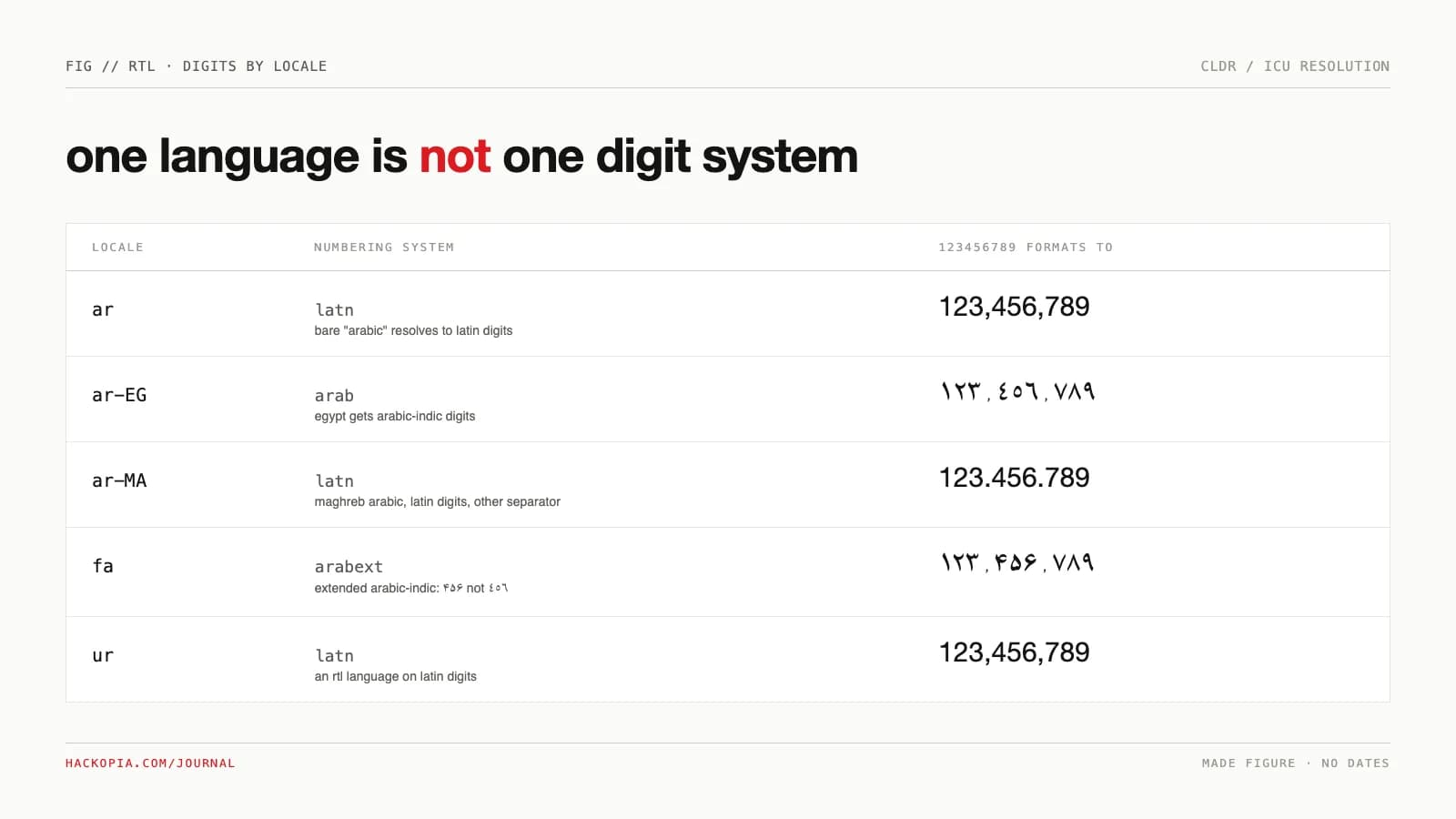
Even the digit choice is per-locale data, not a language attribute. Run this in Node:
const locales = ['ar', 'ar-EG', 'ar-MA', 'fa', 'ur', 'en'];
for (const loc of locales) {
  const nf = new Intl.NumberFormat(loc);
  console.log(loc.padEnd(6), nf.resolvedOptions().numberingSystem.padEnd(8), nf.format(123456789));
}
Actual output on Node 22 (ICU, CLDR defaults):
ar     latn     123,456,789
ar-EG  arab     ١٢٣٬٤٥٦٬٧٨٩
ar-MA  latn     123.456.789
fa     arabext  ۱۲۳٬۴۵۶٬۷۸۹
ur     latn     123,456,789
en     latn     123,456,789
Three things fall out of this one run. Bare ar resolves to Latin digits; Egyptian Arabic gets Arabic-Indic digits; Maghreb Arabic gets Latin digits with a different separator. Persian gets Extended Arabic-Indic digits, which look similar but are different code points: ۴۵۶ versus ٤٥٦. And Urdu, an RTL language, uses Latin digits. "The user speaks Arabic" does not determine which digits your UI should show; the locale does.
Where it bites
The flip/stay lists. Both platforms publish do-not-mirror rules, and the edge cases are where apps break. Apple's list adds video controls and timeline indicators to the usual suspects, and Material puts it flatly: "clocks still turn clockwise for RTL languages." Its sharpest distinction: "Don't reverse the order of numerals in a specific number," because 541 is data, while controls that show progress or counting "reverse the order of numerals" but "never flip the numerals themselves." Get this wrong and a phone number renders backwards.
Mixed strings scramble by rule, not by bug. The W3C lists five conditions that corrupt an opposite-direction phrase: it begins or ends with neutral characters, begins with a number, is followed by a number, sits next to a logically separate opposite-direction phrase, or contains a nested phrase with the opposite base direction. Android's doc names the concrete casualties: PERSON_NAME is calling you, +19876543210, Are you sure? embedded in RTL text. The fix is structural, not cosmetic: "tightly wrap every opposite-direction phrase in markup, and use the dir attribute on that markup," which is what dir="auto" does by reading the first strong character.
Paragraphs have their own direction. Apple's HIG: "Align a paragraph based on its language, not on the current context." A three-line English quote inside an Arabic interface stays left-aligned.
The platforms are still fixing this. Flutter shipped a breaking change for WidgetSpan in RTL text, noting the engine "previously placed inline widget placeholders in source order, even when the surrounding text was visually reordered." And in iOS 26 Apple reworked bidi text selection: instead of "forcing the selection to follow the storage order," selection now follows the cursor. Two decades in, the algorithm still wins arguments against platform engineers.
The numbers
- Per locale: the digit run above is the measured fact: one script, three numbering systems (
arab,arabext,latn), resolved from CLDR data by Node 22's ICU. - Since iOS 9: UIKit controls flip automatically "when the app links against iOS 9 and later," per Apple's internationalization doc; direction-aware layout is the old default, not a new feature.
- Five corruption conditions: the W3C's count of cases where an unwrapped opposite-direction phrase breaks.
Our position
Ship the mirroring the framework gives you, then treat everything it cannot see as design work: run every screen against the flip/stay lists, wrap user-generated text in direction-isolating markup, resolve digits from the locale rather than the language, and align paragraphs to their own language. RTL QA is not "does it look flipped." It is "did the phone numbers, the clocks, and the question mark survive."
The takeaway
alignment, start/end spacing, field icon placement
digit order inside a number, untranslated text, logos
(dir=auto); neutrals and numbers at the edges are the
corruption triggers
in cldr data, not in your assumptions
inside an opposite-direction page
primitives mirror; physical left/right stays put
Bilingual UI is the kind of detail our custom software work treats as a design deliverable, not a translation ticket. If your app reads fine in English and improvised in Arabic, send us the build.
// sources
// next step
We work this way on client projects too.
Tell us what you are making. We reply with a plan, a timeline, and a price.
