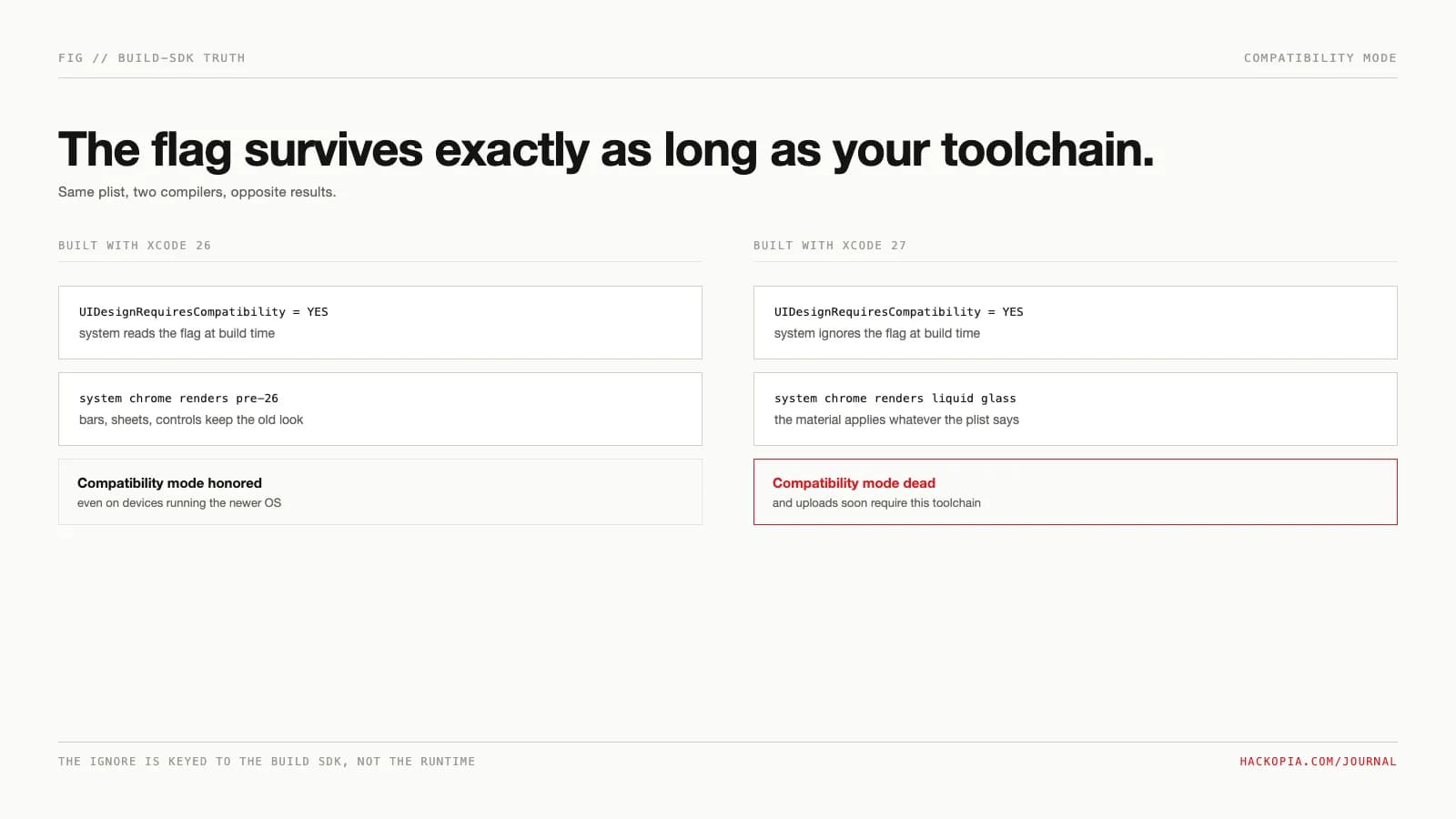
When iOS 26 shipped Liquid Glass in September 2025, every app rebuilt with the new SDK picked up the translucent chrome automatically: navigation bars, tab bars, sheets, controls, all redrawn whether you asked or not. Teams that could not absorb a redesign in one release reached for the escape hatch Apple provided, one Boolean in Info.plist:
<key>UIDesignRequiresCompatibility</key>
<true/>
That key bought time, not a stay. Apple's documentation now states plainly: "The system ignores this key when you build for iOS 27 or later," across iOS, iPadOS, Mac Catalyst, macOS, and tvOS. Xcode 27 shipped September 14, 2026. Starting April 2027, every app update uploaded to App Store Connect must be built with the 27 SDKs. The opt-out has an expiry date, and it is attached to your toolchain, not your roadmap.
The constraint
What the key actually does is narrower than the relief it produced. Set to YES, the system "runs the app using a compatibility mode for UI elements," which "displays the app as it looks when built against previous versions of the SDKs." It is an all-or-nothing, app-wide visual flag: no per-screen granularity, no picking which bars stay opaque. And it governs only what the system draws. It is not a general compatibility shim for the new SDK's behavior or API changes, it never existed on watchOS or visionOS at all, and it says nothing about your app icon, which the system renders as layered glass regardless.
The options
Three paths, and only three. First, set the flag and plan the migration for later: legitimate for a release that cannot slip, expensive if "later" quietly becomes April. Second, migrate now: build with the current SDK, fix what fights the material, ship without the key. Third, do nothing: a binary built with Xcode 26 keeps compatibility mode even on a device running iOS 27, because the ignore is keyed to the build SDK rather than the runtime OS. That sounds like a loophole until you check the second deadline: from April 2027, uploads require the iOS and iPadOS 27 SDK, with a new iOS 15 minimum deployment target attached. Path three keeps the old look only by never shipping again.
The mechanism
The ignore is a compile-time gate. Apple's documentation ties it to the SDK you build against, so the same Info.plist is honored in an Xcode 26 build and silently discarded in an Xcode 27 build. WWDC26's State of the Union said it plainly: "once your app is recompiled with Xcode 27, it will automatically begin to use the new design with Liquid Glass." There is no runtime check to defeat and no secondary flag to set; the only variable is which toolchain produced the binary.
Where it bites
The bite is not the deadline; it is the assumption the flag made easy. Teams that shipped with YES and stopped looking are carrying custom bar appearances (UIBarAppearance overrides, background colors on navigation and tab bars) that Liquid Glass renders as opaque slabs floating over content, exactly the artifacts Apple's adoption doc warns against: "Any custom backgrounds and appearances you use in these elements might overlay or interfere with Liquid Glass." Apple's checklist: standard components first (they adopt the material for free), strip custom bar backgrounds, audit sheets and popovers that were pinned to opaque assumptions, test under Reduce Transparency and the new tinted setting, and reserve the material for chrome, since the HIG is explicit that Liquid Glass does not belong in the content layer. None of that is discoverable while the flag hides the result.
The numbers
ios 26, ipados 26, macos tahoe 26 and the
rest; apple calls the opt-out temporary:
"removed in the next major release"
for the material
standard components adopt liquid glass on
rebuild, opt-out key still honored
and upgrades the toggle to a slider
deployment floor; macos absent from the
table
Note the asymmetry: the April 2027 requirement lists iOS, iPadOS, tvOS, visionOS, and watchOS. macOS is absent, so a Mac-only app can stretch the flag by staying on Xcode 26. And the glass intensity itself is now partly a user setting, so even a migrated app's look is not fully yours.
Our position
Set the key if you must, but treat it like a feature flag with a court date. The teams that will feel April 2027 are the ones who flipped YES in September 2025 and called the migration done; the flag made the debt invisible, not paid. The honest sequence is the one Apple describes: build with the current SDK, fix the chrome that fights the material, then delete the key before the toolchain deletes it for you. There is also a scheduling asymmetry worth exploiting: the requirement binds on upload, so the cost of checking today is one Xcode 27 build, not a release. Run your app with the flag removed in a simulator and look at the bars. Whatever you see is what every user will see next spring.
The takeaway
pre-26 rendering of system chrome; app-wide,
no per-screen granularity
behavior, not icons, never existed on
watchos or visionos
stale xcode 26 binary keeps compat mode
even on ios 27 devices
backgrounds, test tinted and reduce
transparency, keep glass out of content
shows exactly what ships in april
Visual-platform migrations like this are the maintenance we run across app releases in our product engineering work, the same class of forced adaptation as both stores' yearly update rule. If your Info.plist still says YES and nobody has looked at the app under Xcode 27, send us the build.
// sources
// next step
We work this way on client projects too.
Tell us what you are making. We reply with a plan, a timeline, and a price.
