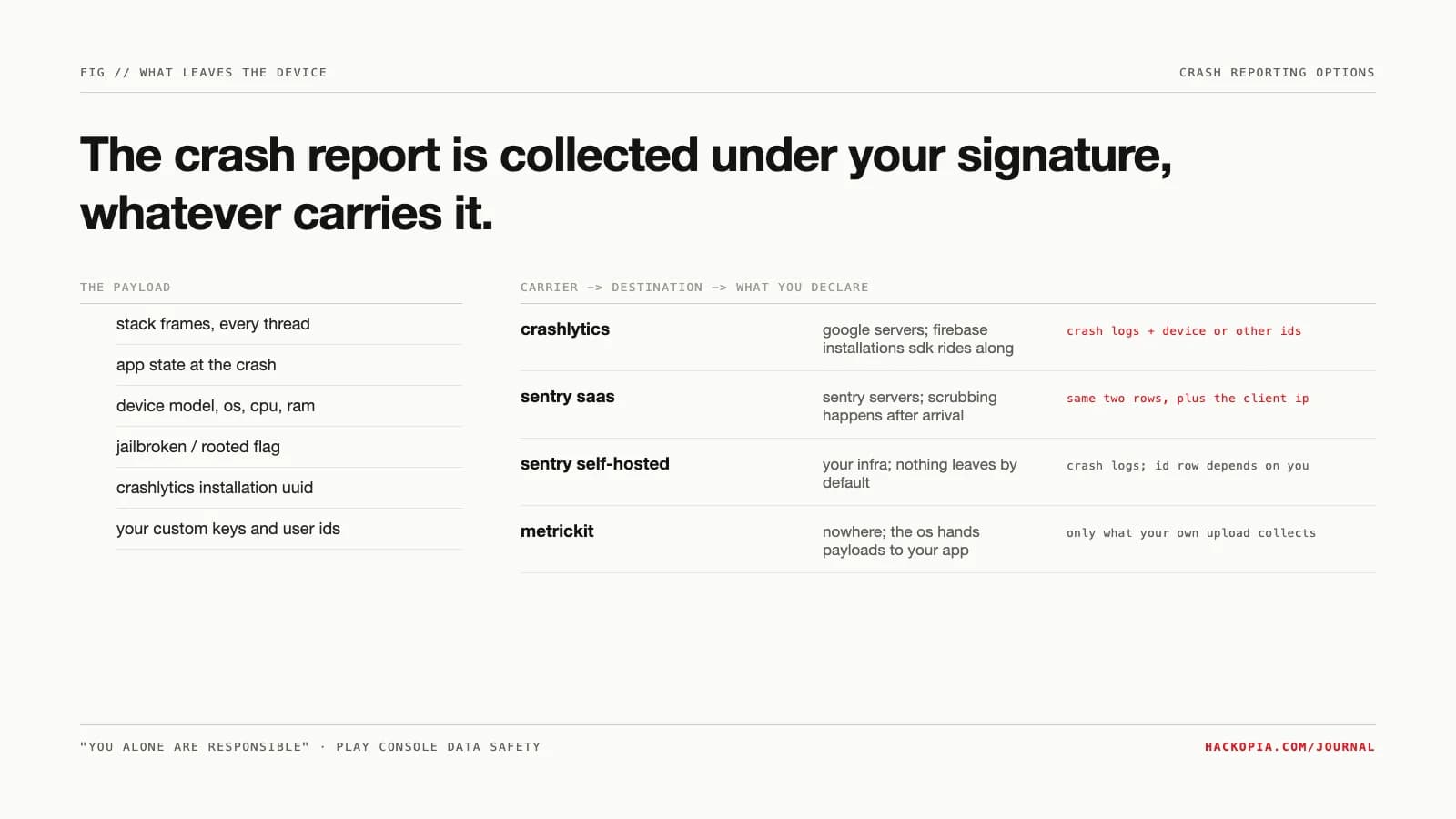
An app that crashes silently is an app that gets uninstalled. So the crash reporter is non-negotiable: someone has to receive the stack trace. The question is who receives it, what else rides along, and whose name is on the store declaration when it does. That declaration is yours either way. Google is explicit: "You alone are responsible for making complete and accurate declarations in your app's store listing on Google Play," including "data collected and handled through any third-party libraries or SDKs used in their apps."
The constraint
A crash report is a snapshot of a dying process. Google's own disclosure of what Crashlytics sends shows the shape: stack traces and app state at the moment of the crash, device metadata, and a "Crashlytics installation UUID" generated to count affected users. Firebase's privacy page itemizes further: every frame's instruction pointer, the device model, CPU architecture, RAM, whether the device is jailbroken or rooted, the binary images loaded in memory, and the Firebase Installation ID of the app instance.
None of that is sinister; a stack trace is what you asked for. The problem is the delivery vehicle. Crashlytics drags the Firebase installations SDK into your binary transitively, and Google's data-safety definitions name "Firebase installation ID" as a declarable "Device or other IDs" entry. So a crash reporter quietly buys you two declaration rows, "Crash logs" and "Device or other IDs," plus whatever custom keys and user IDs your team attaches. The constraint to hold: the SDK you ship collects under your signature, not the vendor's.
The options
Crashlytics. The default answer because it is genuinely good and free: Crashlytics is a no-cost Firebase product on both the Spark and Blaze plans. The price is not money, it is the data path. Reports go to Google, automatic collection is on by default for all users, and Apple's privacy details page is blunt about what that means: "even if you collect the data for reasons other than analytics or advertising, it still needs to be declared." You can flip to opt-in collection, but Google's own docs warn it reduces the accuracy of your crash-free metrics.
Sentry SaaS. Better tooling, real cost. Sentry is volume-priced: a free developer tier, then paid plans with an error quota and pay-as-you-go rates above it. The data path is the same shape as Crashlytics: your users' crash payloads land on Sentry's servers. Sentry does run server-side scrubbing by default, filtering values that look like credit cards and keys whose names contain "password," "secret," "api_key," "token," and friends. But scrubbing happens after the bytes leave the device, it is "generally not retroactive for events that have already reached Sentry," and the server still sees the connecting IP.
Sentry self-hosted. The only popular option where no crash byte leaves your infrastructure. The catch is honest: this is an operations commitment, not a download. Sentry's published minimums and CPU requirements are steep enough that they belong in the numbers section below, and the errors-only profile exists but is exactly that: Issues, Alerts, Integrations, Dashboards, Releases, and Errors. No traces, profiles, replays, or crons.
No SDK at all: MetricKit. On iOS, the OS itself is the collector. MetricKit is a first-party framework that aggregates performance and diagnostic data on-device, then hands your app a daily metrics payload plus diagnostic reports, crash reports included. Nothing is embedded from a third party, nothing leaves the device unless your own code uploads it, and there is nothing new to declare that you did not already declare. The limitation is the mirror of its strength: Apple-only, daily cadence on metrics, and you build your own backend to receive whatever you forward.
The mechanism
The declaration trail is the mechanism teams miss. It runs SDK, store form, your signature, in that order, and the store asks about the SDK's behavior, not yours:
+ firebase installations sdk rides along transitively
+ your custom keys, logs, user ids, non-fatal events
app store privacy label: diagnostics + device identifiers
signed by you, "you alone are responsible" per google
sentry saas: quota-priced, payload + client ip at sentry
sentry self-hosted: a vm you operate end to end
metrickit: $0, ios only, daily payloads, your own backend
The other mechanism worth knowing is opt-in collection. Crashlytics can store crash reports on-device when collection is disabled, and your code can check for them with checkForUnsentReports and transmit them with sendUnsentReports. That is the privacy-respecting pattern Google itself documents: collect with consent, hold locally, transmit on approval.
The same forms audit the rest of the dependency tree too; we walked the SDK-by-SDK declaration work in Apple wants a privacy manifest for every SDK you ship.
Where it bites
Self-hosted Sentry bites hardest. Sixteen gigabytes of minimum RAM, another sixteen of swap, and a ClickHouse that will not boot on older CPUs means your "free" crash reporter is a VM, a backup plan, a version-upgrade schedule, and an on-call rotation. For a two-person studio shipping one app, that is a server you now run forever to save a privacy declaration row.
SaaS scrubbing bites differently: it creates a false sense of hygiene. The payload reaches the vendor first and gets cleaned second, so anything the scrubber misses is already collected. And MetricKit bites by omission: it gives you Apple-platform crashes on Apple's cadence, no breadcrumbs, no custom context, no dashboard, and nothing for Android, where you are back to the same decision with no equivalent escape hatch.
The numbers
- Sentry self-hosted minimums: 4 cores, 16 GB RAM + 16 GB swap, 20 GB disk; errors-only profile installs at 2 cores and 7 GB. ClickHouse 26.6+ requires x86-64-v3 (AVX2).
- Sentry SaaS: free developer tier, then Team from $26/mo and Business from $80/mo billed annually, with pay-as-you-go event rates above the included quota (50K errors included on Team).
- Crashlytics: no-cost on Spark and Blaze plans; custom logging capped at 64 kB per report.
- Google Play data safety defines the declaration: "Crash log data from your app. For example, the number of times your app has crashed, stack traces, or other information directly related to a crash," with "Device or other IDs" covering identifiers like the Firebase installation ID.
Our position
Default to Crashlytics or Sentry SaaS and declare honestly. For the apps we ship, the privacy cost of a mainstream SDK is smaller than the engineering cost of self-hosting a crash pipeline, and the declaration rows are what the forms exist for. Reserve self-hosted Sentry for clients whose regulators or contracts say crash bytes cannot leave their infrastructure; that is a real requirement some buyers have, and the errors-only profile makes it survivable. Treat MetricKit as a supplement on iOS, not a substitute. Whatever you pick, audit what you attach: the custom key that logs a user's email into every crash report is your privacy problem, not the SDK's.
The takeaway
budget 2c/7gb minimum, 4c/16gb+swap for feature-complete
diagnostics + identifiers on the app store label
your signature, not the vendor's
The declaration work is the part we handle in support engagements and on our own apps like CashTaq: same SDK, same forms, same signature. If your store listing's data-safety section was last edited by whoever shipped the app in 2023, send us the package name and we will reconcile it against what the binary actually sends.
// sources
// next step
We work this way on client projects too.
Tell us what you are making. We reply with a plan, a timeline, and a price.
