Your app sends a password reset and it lands in spam. The email code is fine; the problem is that the mailbox providers rewrote the admission rules, and a domain that was grandfathered for a decade is now being graded like a stranger. Since early 2024 the three biggest consumer mailboxes publish near-identical checklists, and at least one of them answers failure with an SMTP rejection instead of a spam folder.
The rulebook changed while nobody watched
Gmail drew the first line: "Starting February 1, 2024, email senders who send more than 5,000 messages per day to Gmail accounts must meet" a harder checklist, and bulk status is permanent ("Senders who meet the above criteria at least once are permanently considered bulk senders"). Then in November 2025 the enforcement escalated: "Messages that fail to meet the email sender requirements will experience disruptions, including temporary and permanent rejections." Yahoo published the same requirements without naming a volume ("We will not specify a volume threshold"). Microsoft went furthest for domains sending more than 5,000 emails a day to Outlook.com: as of May 5, 2025, non-compliant mail is rejected outright with 550 5.7.515 Access denied, sending domain ... does not meet the required authentication level. That is not the spam folder. That is the mail never existing.
What the three records actually do
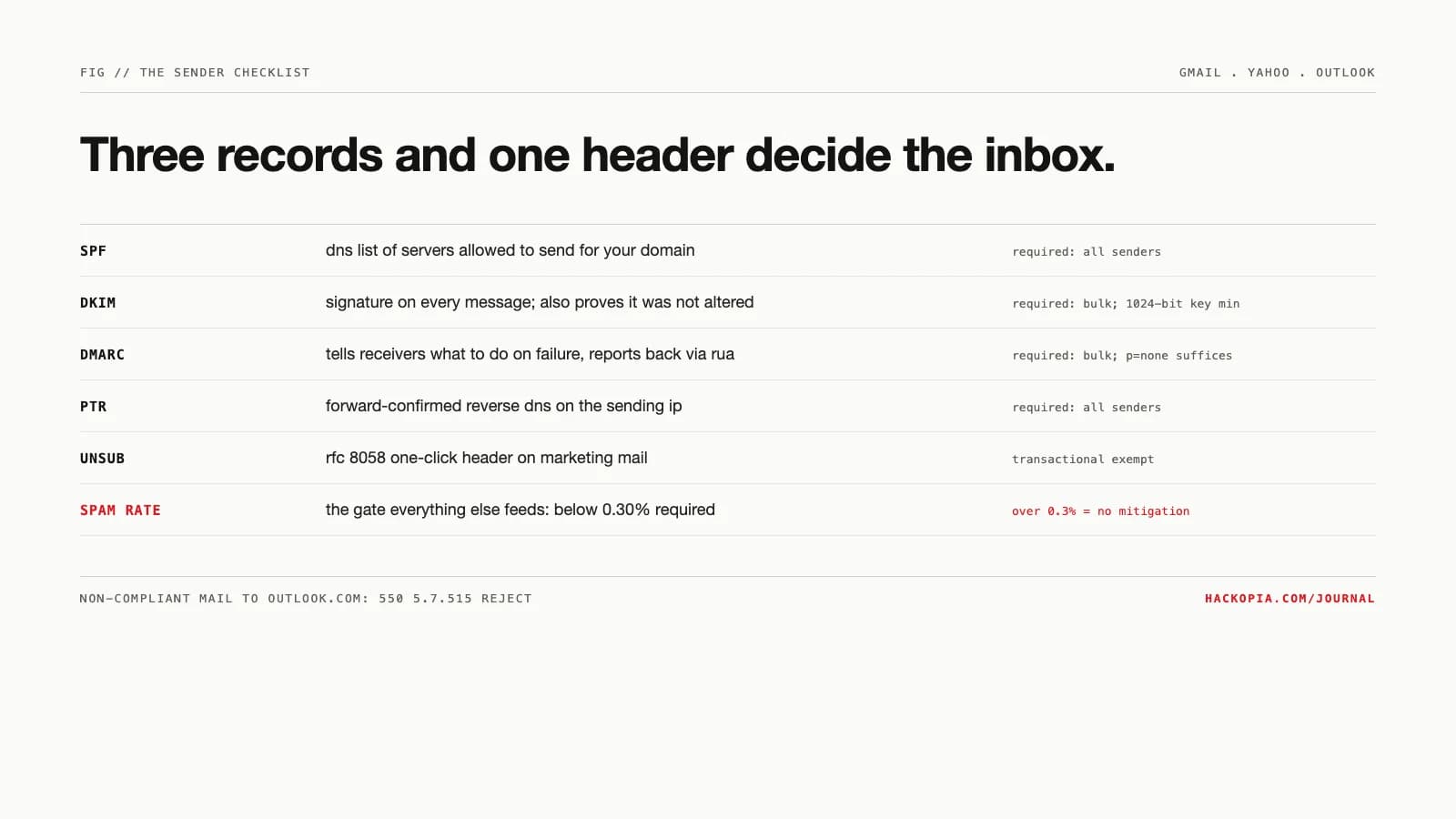
The checklist is three DNS records and a header, and each does one job:
- SPF "Specifies the servers and domains that are authorized to send email on behalf of your organization." A list, checked against the sending IP.
- DKIM "Adds a digital signature to every outgoing message," and the signature is what lets the RFC 8058 one-click unsubscribe work; it also "prevents message content from being changed when the message is sent between servers." Yahoo wants a 1024-bit key minimum.
- DMARC "Lets you tell receiving servers what to do with outgoing messages... that don't pass SPF or DKIM," plus reports back to you. The part people miss: DMARC does not require both to pass. Google's wording: "the domain in the sender's From: header must be aligned with either the SPF domain or the DKIM domain," and RFC 9989's default "relaxed" alignment only requires the organizational domains to match, so a transactional provider's subdomain can satisfy it.
For bulk senders all three are mandatory at all three providers, and p=none satisfies every one of them. p=none is not "do nothing": with a rua address it turns on the aggregate reports that tell you which sources are failing. The escalation order Google recommends is none, then quarantine, then reject.
The number that actually gates delivery
Authentication gets you graded; complaint rate decides your inbox share. The requirement line is "Keep spam rates reported in Postmaster Tools below 0.30%," but the guidance is stricter in spirit: "Keep spam rates reported in Postmaster Tools below 0.10% and avoid ever reaching a spam rate of 0.30% or higher." And the penalty for crossing it is isolation: since June 2024, "bulk senders with a user-reported spam rate greater than 0.3% will be ineligible for mitigation," meaning Gmail will not even help you recover.
One subtlety worth knowing: Postmaster Tools measures "the spam rate of DKIM-authenticated messages sent to Gmail accounts," and only messages "delivered to engaged recipient's Inbox" count. A low dashboard number can coexist with a spam-foldered stream, because filtered mail never had the chance to be reported. The number is a floor for trouble, not a clean bill.
Why the fix feels slow
New IPs and quiet domains start cold, and reputation does not transfer between mailbox providers. AWS's warmup doc is the plainest statement of the mechanics: ramp gradually, "for some email providers, you can establish a positive reputation in around two weeks, while for others it may take up to six weeks," and reputation is per-provider, so an IP warm at Gmail is still cold at Outlook. Warming "to your most active users" first keeps complaint rates low during the ramp; high bounce or block rates mean slow down. And once warm, you "must then maintain a consistent sending pattern," so a monthly blast from a quiet domain re-reads as a cold spike every time.
Our position
Set up all three records on the sending domain before any volume matters, with rua reporting on p=none from day one so failures are visible before they are enforced. Then decide sending identity once: one subdomain for transactional mail, a different one for marketing, so a promotional campaign can never cost you the password-reset stream. If you are under Gmail's bulk line, the same checklist still applies in spirit; Yahoo explicitly enforces without a published threshold. Treat Postmaster Tools as required monitoring, not an optional dashboard, and budget the warmup window into any provider switch: two to six weeks is not a scare quote, it is the documented range.
The takeaway
dkim: sign every message, >=1024-bit key
dmarc: p=none minimum, add rua= for reports
ptr: forward-confirmed reverse dns on the ip
transactional mail exempt but still authenticated
>0.3% = no mitigation, postmaster tools or bust
microsoft rejects non-compliant mail since may 2025
yahoo enforces with no published threshold
send to engaged users first, steady volume after
We run this checklist on every app that sends mail, including the transactional streams behind CashTaq, and it is part of the launch block in our product engineering work. If your reset emails are landing in spam, send us the domain and we will tell you which line item is failing.
// sources
// next step
We work this way on client projects too.
Tell us what you are making. We reply with a plan, a timeline, and a price.
